
The best AI tool for game development depends on the job: GitHub Copilot or Claude for code, Unity’s or Epic’s own assistants inside the engine, Scenario or Adobe Firefly for 2D art, Meshy or Tripo for 3D drafts, and ElevenLabs for voices. We checked 14 tools against their official pricing and terms pages on 21 November 2026 and left out popular tools we could not verify, so this is a list of 14, not a padded 15.
AI is changing how indie developers, small studios and large teams work, and it can speed up coding, concept art, 3D drafts, animation, sound and testing. It does not supply game design: knowing why a mechanic is fun, how a level teaches, or when a feature should be cut. If you want the player-side picture first, read our guide to how AI is changing video games.
What are AI game development tools?
- AI coding assistants write, explain and debug code. They mostly work in your code editor or the terminal, not inside the game engine.
- AI image generators make concept art, sprites, icons and textures.
- 3D asset generators turn a prompt or an image into a draft model.
- Animation and video tools generate motion, cutscene footage or reference clips.
- AI audio tools produce voices, sound effects and music.
- Game design assistants brainstorm mechanics, write documentation and balance spreadsheets. General chat assistants do this job.
- Testing and debugging tools find bugs and test builds. Large studios build much of this in-house, so we cover it only where a tool is available to you.
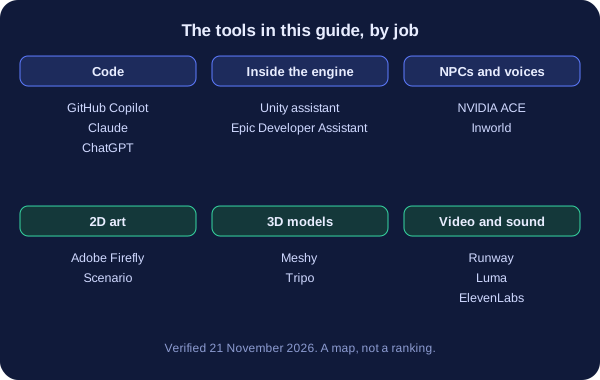
Best AI tools for game developers in 2026
Prices are US dollars on 21 November 2026, before tax, and can differ by region. Each entry gives what the tool is for, how it fits your workflow, its main limit and where to check the licence.
Coding and design assistants
1. GitHub Copilot
Best for: completions and code review inside the editor you already use. It works as a plug-in to code editors, so it helps with Unity C# and Unreal C++ because those are code files, not because it talks to the engine. Plans on the official plans page: Free ($0, 2,000 completions a month), Pro ($10), Pro+ ($39) and Max ($100). Chat, agent mode and code review use “GitHub AI Credits” (1 credit = $0.01), while completions stay unlimited on paid plans. Verified students can get a Student plan. Limit: you review every line; the suggestions can be wrong.
2. Claude
Best for: reading a whole project, explaining unfamiliar code and refactoring with Claude Code. Per Anthropic’s pricing page: Free ($0, no Claude Code), Pro ($20 a month, or $17 on annual billing) and Max ($100). Pro and Max include Claude Code. It is not an engine plug-in; it works with your files and terminal, and Unity’s free MCP server lets outside agents work with the Editor (see below). Limit: usage caps apply per five-hour window and per week.
3. ChatGPT
Best for: brainstorming mechanics, writing design documents and quick code snippets. The pricing page lists Free, Go, Plus, Pro and Business plans with Codex coding access that grows by tier, but showed no dollar amounts when we checked, so confirm the price there. Limit: like the other assistants, it has no built-in awareness of your project unless you give it files.
Engine and character tools
4. Unity’s in-editor AI assistant
Best for: Unity developers who want help that can inspect scenes and GameObjects and make Editor changes. Unity’s page says the assistant is included with Pro, Enterprise and Industry plans, while Personal gets a free trial that converts to $10 a month. It uses credits that vary by model. The MCP server and plug-in are free and let outside agents work with the Editor, and an AI Gateway connects an agent you already pay for. The tools are labelled beta. Licence note: generated assets carry AI metadata, and Unity says developers are “fully responsible” for store declarations and usage rights.
5. Epic Developer Assistant (Unreal Engine)
Best for: Unreal questions and C++ drafts. Epic’s announcement says it answers Unreal Engine 5.6 documentation questions and generates C++ on the Epic Developer Community site, and that Unreal Engine 5.7 would bring it into the editor. The post does not state a price, so check Epic. Limit: Epic says the assistant will continue to evolve, so verify its answers against the documentation.
6. NVIDIA ACE
Best for: studios building talking or autonomous characters. NVIDIA’s ACE announcement names PUBG: Battlegrounds, inZOI, NARAKA: Bladepoint, MIR5, AI People, Dead Meat and a ZooPunk tech demo, with several running local models on GeForce RTX GPUs. It is a developer technology, not a download for solo hobbyists, and we found no public price. Limit: needs RTX hardware for local use, and results vary by game.
7. Inworld
Best for: voices and live dialogue. Inworld’s pricing page lists a pay-as-you-go On-Demand plan at $0 that includes up to 70 minutes of text-to-speech, 100 custom voices and access to 100-plus language models, with text-to-speech from $25 per million characters at that tier. Its focus has shifted over time, so check that the product still matches what you need before building on it.
2D art and 3D models
8. Scenario
Best for: consistent 2D art in one style. Pro and Max plans let you train custom models on your own art (10 to 30 images for a style). On the pricing page: Starter $15 (1,500 credits), Pro $45 (5,000 credits), Max $75 (10,000 credits); the free plan is for personal and evaluation use only. Paid plans include a commercial licence: you can ship outputs in games without royalties. Trained models are private by default.
9. Adobe Firefly
Best for: concept art, textures and UI elements with a clearer licensing story. Adobe’s plans: Free (limited daily generations), Standard $9.99 (2,000 credits), Pro $19.99 (4,000) and Pro Plus $49.99 (10,000), with introductory discounts that end on a stated date. Adobe says Firefly models are trained on licensed and public-domain content and the output is safe for commercial use. For partner models inside Firefly, you judge whether the output fits your project.
10. Meshy
Best for: quick 3D drafts and props. On the pricing page the free plan gives 100 credits and up to 10 assets a month, under a Creative Commons Attribution 4.0 licence. Paid plans make assets private, and the page describes Pro and above as customer-owned. The page showed prices in Saudi riyals for us, so check your own currency. Limit: generated meshes usually need cleanup, retopology and rigging before they are game-ready.
11. Tripo
Best for: a second opinion on 3D generation. Tripo’s pricing page would not load for us, so we are not quoting prices; independent summaries disagree on amounts. Tripo’s own guidance says free-plan models come under a Creative Commons licence and paid plans include private models and commercial use. Read its licence text before shipping.
Animation, video and audio
12. Runway
Best for: trailers, cutscene drafts and reference footage. On the pricing page: Free (125 one-time credits), Standard $12 a month on annual billing ($15 monthly), Pro $28 ($35) and Max $76 ($95). The page lists no watermarks from Standard. It does not describe commercial-use rights, so read the terms of use before using clips in a released game.
13. Luma
Best for: AI video for trailers and concept footage with Luma’s Ray models. Plans: Plus $30 a month (10,000 credits, commercial use listed), Pro $90 (40,000) and Ultra $300 (150,000). No free plan was listed. Limit: video is a marketing and previs tool, not a source of game animation you can drop into an engine.
14. ElevenLabs
Best for: voices, sound effects and music. The pricing page lists Free ($0, 10,000 credits, about 10 minutes), Starter $6 (30,000), Creator $22 (121,000) and Pro $99 (600,000). A commercial licence starts at Starter, including for music. Sound effects cost about 200 credits a generation. If you replace human voice actors, check your platform’s and any union rules first; Steam also asks you to disclose shipped AI voice content.
Best AI coding tools for game developers
| Need | Strong fit | How it connects to your engine |
|---|---|---|
| Fast completions while typing | GitHub Copilot | Plug-in for your code editor; works on Unity C# and Unreal C++ files like any other code |
| Explaining and refactoring a big project | Claude (Claude Code) | Reads your files from a terminal or editor; no built-in engine integration |
| Brainstorming, design docs, snippets | ChatGPT | Chat and Codex; you paste or attach context |
| Acting inside the Unity Editor | Unity assistant, or an outside agent through Unity’s MCP server | Direct Editor access through Unity’s own tools (beta) |
| Unreal documentation and C++ | Epic Developer Assistant | Web assistant for 5.6; editor integration planned for 5.7 per Epic |
For Unity C#, all of these can explain a script, draft a MonoBehaviour, write unit tests and find a null reference, provided you paste the relevant code and the error. For Unreal C++, they help with syntax, headers and build errors, but Unreal’s macros and reflection system mean you should always compile and test. For Blueprints, we could not verify that any tool here edits Blueprint graphs directly; you can describe a graph in text and ask for an explanation. Whichever tool you use, run the code before you trust it.
Best AI tools for creating game assets
For 2D character art, backgrounds, icons and UI, Scenario (consistency from custom models) and Adobe Firefly (a clear licensing statement) are the strongest verified choices. For textures, Firefly and Scenario can both generate images you can turn into textures, but check seams and tiling in your engine. For 3D models and environment props, Meshy and Tripo produce drafts. Use AI assets when you need placeholders, variations or a fast first pass. Do manual work when the asset defines your game’s identity: the main character, the logo, the key props and anything that must animate cleanly.
Best AI tools for game animation and audio
Runway and Luma generate video: useful for trailers, mood boards and previs, but they do not produce rigged, engine-ready character animation. For voices, ElevenLabs offers licensed commercial use from its Starter plan, and Inworld offers text-to-speech with pay-as-you-go pricing. Music and sound effects from ElevenLabs are available on the free plan for testing, but commercial music use starts at Starter. Always keep the plan name and date of generation, because licence terms can change.
Best AI tools for Unity and Unreal Engine developers
| Engine | Direct engine support (verified) | Works through your code editor or files |
|---|---|---|
| Unity | Unity’s in-editor assistant (beta); free MCP server and plug-in for outside agents; AI Gateway | GitHub Copilot, Claude, ChatGPT |
| Unreal Engine | Epic Developer Assistant (web, with editor integration planned for 5.7) | GitHub Copilot, Claude, ChatGPT |
| Either engine | NVIDIA ACE for characters (developer technology) | Scenario, Firefly, Meshy, Tripo, Runway, Luma, ElevenLabs export files you import yourself |
Free vs paid AI tools for game development
| Tool | Free option | Paid plans from (USD/month) | Commercial-use note |
|---|---|---|---|
| GitHub Copilot | Free: 2,000 completions | $10 (Pro) | Check GitHub terms for your use |
| Claude | Free, no Claude Code | $20 monthly, $17 annual (Pro) | Check Anthropic terms |
| ChatGPT | Free plan listed | Price not shown on page | Check OpenAI terms |
| Unity assistant | Trial on Personal | $10 (Personal, after trial) | You verify usage rights |
| Scenario | Personal or evaluation use only | $15 | Commercial licence on paid plans |
| Adobe Firefly | Limited daily generations | $9.99 | Adobe states commercial use is safe for Firefly models |
| Meshy | 100 credits, CC BY 4.0 | Shown in local currency | Paid assets private; Pro and above customer-owned |
| Runway | 125 one-time credits | $12 annual, $15 monthly | Not stated on pricing page |
| Luma | None listed | $30 | Commercial use listed on Plus |
| ElevenLabs | 10,000 credits | $6 | Commercial licence from Starter |
Best AI tools for different types of developers
- Beginners: start with a free assistant (Copilot Free, Claude Free or ChatGPT Free) to explain code, and keep your first game tiny.
- Indie and solo developers: one coding assistant, one art tool and a paid ElevenLabs or Scenario plan only when you have a game worth polishing.
- Small studios: Scenario’s custom models and shared plans help keep a consistent style across several artists.
- Professional studios: use enterprise terms, check data handling, and look at engine-level tools such as Unity’s assistant or NVIDIA ACE.
- 2D developers: Scenario or Firefly for art, ElevenLabs for audio.
- 3D developers: Meshy or Tripo for drafts, with manual cleanup in your 3D package.
- Unity developers: the Unity assistant, plus Copilot or Claude in your code editor.
- Unreal developers: Epic Developer Assistant, plus Copilot or Claude for C++.
Can you build a complete video game using AI?
You can build a small, simple game with heavy AI help, and people do. AI can scaffold code, draft prototypes, produce art and audio, and suggest test cases. It cannot decide what makes your game worth playing, balance difficulty by feel, test on real devices, pass store review for you or optimise performance on target hardware. Plan for AI to cover the first draft of many tasks and for you to finish them. A browser game is a good first target; see how instant-play games work in our guide to instant-play games, and try the puzzle and arcade games on PapoGames for scope inspiration.
Risks of using AI tools in game development
- Copyright: the US Copyright Office said in January 2025 that prompts alone do not make you the author of AI output. Human changes and arrangement can still be protected, so keep records.
- Commercial licensing: free plans often restrict use (Scenario) or require attribution (Meshy). Screenshot the terms you shipped under.
- Asset consistency: AI art drifts in style unless you use custom models or heavy editing.
- Code quality and security: assistants can invent functions and miss security issues. Review and test everything.
- Privacy: check what a tool does with your code and art. Unity says user data is not used to train models by default, and offers an opt-in.
- Dependency: tools change plans and models. Keep source files you can rebuild without the service.
- Cost at scale: credits run out quickly when you iterate. Budget before you commit.
- Disclosure: Steam asks developers to disclose AI-generated content that ships to players; see the Steamworks content survey.
Conclusion
There is no universal winner. If you write code, start with Copilot, Claude or the Unity or Epic assistant. If you need art, try Scenario for consistency or Firefly for licensing clarity. For 3D, treat Meshy and Tripo output as drafts. For audio, ElevenLabs is the most documented option here. Spend on one tool at a time, keep your licence records, and judge every output as a player would. For more context, see how the best gaming platforms compare once your game is ready to share.